
Workspaces: Context-First Document Management
Introducing M-Files Workspaces: A New Era for Document Management


Unlocking the Power of Context-First Document Management
Today we're diving into M-Files Workspaces, a breakthrough in how businesses manage documents, projects, and processes. Joining us is Tony Grout, Chief Product Officer at M-Files, who shares what makes Workspaces a game-changer for knowledge workers and why it represents the next evolution of document management.
What is M-Files Workspaces?
"Workspaces is the first time users truly get to experience the full power of M-Files' architecture," Tony begins. "While our document management system has always been incredibly robust, Workspaces introduces a business application and user experience layer that sits on top of our context-first platform."
This new layer transforms how people engage with information by replacing file-centric workflows with context-driven Workspaces, tailored around how businesses operate.
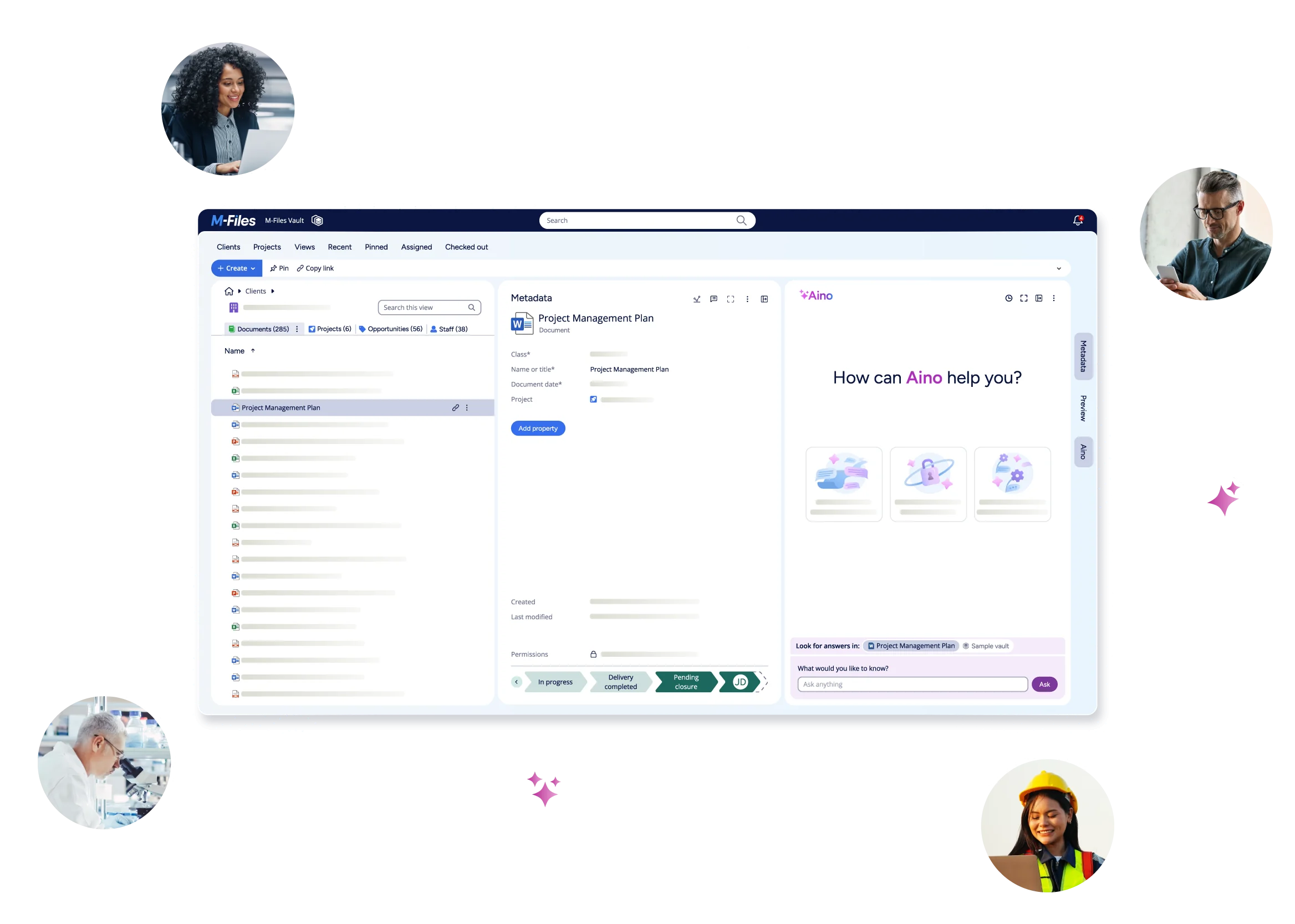
Instead of navigating through complex folder trees or static lists, users now see everything that matters, documents, projects, clients, and stakeholders, in a single, unified view.
Tony explains:
"It encapsulates business processes inside the user experience in a way that no other document management system can. Rather than starting from a folder or a document, you start from the context, a project, a client, or a component. From there, you can instantly see all related information, people, and documents. It's your dedicated workspace for your role, bringing together everything you need in one place."
Imagine opening a single screen where you can instantly see:
- Your project overview and all related documents
- The client or account associated with that project
- The team members involved and their current tasks
- Contracts, proposals, communications, and version history, all automatically connected
"It's one single pane of glass," Tony says. "A viewpoint for those business users who don't have an application dedicated for them."
Where Does the Need Come from for Both Business and User Perspectives?
"The need for Workspaces comes from a simple truth: most knowledge workers don't have an application dedicated to their role," Tony explains. "Sales teams have CRM, finance teams have ERP, but those who work with documents typically rely on generic office tools. Workspaces changes that."
He continues:
"Most people spend a staggering amount of time just finding things before they can actually do their work. By starting from the context of your role, say, a project or client, you can jump straight to what matters. You spend less time searching and more time doing."
Workspaces also eliminates friction between tools and screens. "Instead of juggling multiple systems, everything comes together in one pane of glass," Tony says. "It allows integrations to your CRM and ERP to pull information into one view—so you can see the client from your CRM, the documents from your ERP, and all the related work in one place."
He adds an example from his experience:
"I once worked at an organization where the saddest thing IT ever gave people was two screens, because they had so many applications, they had to work through just to do their job. Workspaces brings it all into one screen. You're not cutting and pasting or switching windows; your work just flows."
What Makes M-Files Workspaces Unique in the Market?
Having worked across the document management landscape, Tony brings a candid perspective:
"I've worked for the competition before, so I know what's out there. No other competitor has our knowledge graph-like, context-first architecture that's been part of M-Files from day zero. Most systems still rely on folders and basic metadata—that's 2010 thinking."
He continues:
"Their so-called ‘workspaces' are really just shared folders with some metadata—like what SharePoint and OneDrive solved years ago. But M-Files Workspaces is fundamentally different. It lets you navigate seamlessly between documents and other business artifacts, like projects and people. It's not just about storing files—it's about connecting the dots."
Another major differentiator is how Workspaces bridges on-premises and cloud environments.
"Whether you're working locally or in the cloud, you get the same intuitive experience," Tony explains. "All your projects, documents, and integrations are unified. That kind of flexibility and consistency across environments is something competitors simply don't offer."
He also emphasizes the architectural advantage for AI:
"AI loves context. Our architecture connects the dots between documents, projects, and people, which makes our platform smarter. Because our knowledge graph constrains AI to the right context, it delivers better-quality answers and insights. It's a superpower."
Key Benefits of M-Files Workspaces
Faster Access to What Matters
Why start with a search when you can start with context? Workspaces lets users begin where their role begins, at the project, client, or component level, so they can get straight to work.
Complete Context at Your Fingertips
All related information, documents, emails, tasks, and records, come together in one place. "It's one single viewpoint, the connecting visualization for a user of all the things they care about and the relationships between them," Tony says.
One Screen, Not Two
Workspaces consolidates your digital environment into a single, modern interface—reducing clutter and helping you stay focused.
Productivity Unleashed
"It's a real accelerant," Tony says. "It makes you so much more productive. Instead of spending your day looking for things, you spend your day doing things."
Why Workspaces is the Future of Document Management
"For me, Workspaces is the future of how people should think about documents," Tony concludes.
"Documents don't live in isolation. They live in the context of business processes, projects, and people. Workspaces pulls all of that into a single view so you can get your work done faster. Rather than worrying about navigating around documents, you get straight to your job and add value to your organization. Workspaces puts you in the context of your job, instantly."
He adds with a smile:
"It's about choosing your journey—but choosing the fastest way to get to your goal."
A New Standard for Intelligent Work
M-Files Workspaces isn't an add-on—it's a paradigm shift in how organizations manage, find, and use information. By unifying content, context, and collaboration in one intuitive experience, Workspaces ushers in a new era of intelligent, frictionless document management—where work happens naturally, context drives everything, and productivity soars.
If you're ready to transform how your organization manages information, M-Files Workspaces is your next step toward a smarter, more connected way of working.
Ready to discover the power of M-Files? Schedule a demo now.
Latest Articles
Browse Topics
Resources
See M-Files in Action