

M-Files Custom Agents: AI That Reads, Reasons, and Routes
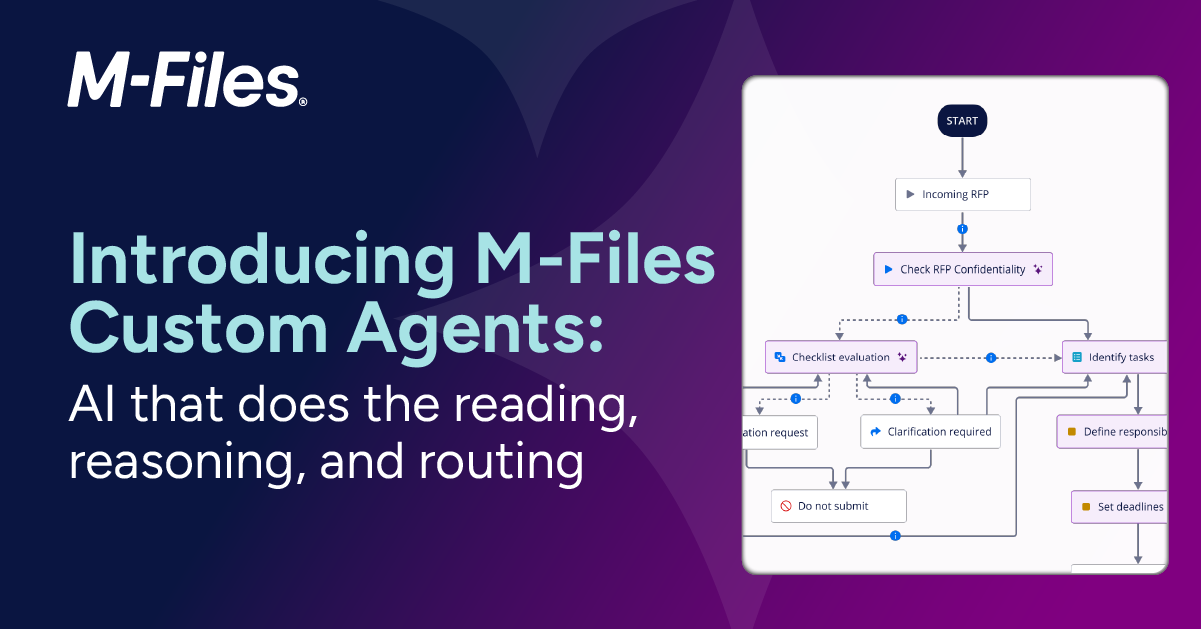
Introducing M-Files Custom Agents: AI that does the reading, reasoning, and routing

By Tapio Luostarinen, Janne Uitto, Yen Hoang, and Minja Alakoski
Invoices waiting for someone to check them against the contract. Vendor risk evaluations due, with signals scattered across non-conformance records, contracts, and certifications throughout the system. Inspection sheets that need every measurement verified against the product specification before a batch can be accepted. These are not hard problems. They are well-defined, the information is there, and the right answer is usually clear to anyone who takes the time to read everything. That's the bottleneck: someone has to. AI can read all of it faster than any person. But when it is pointed at ungoverned content, folders, flat files, and disconnected sites, it produces fast, plausible, unaccountable answers. The bottleneck was never speed. It was speed you could trust. Generation is a commodity; governed generation is not.
Today we are introducing M-Files Custom Agents, AI-powered workflow steps that read, reason, and act on your behalf, configured in natural language by administrators, with no custom development required.
How it works
An invoice arrives and enters the verification state. By the time it reaches the approver, the agent has already read the contract, recorded its findings, and set a recommended action. No one kicked it off. The work just happened. For the people whose workflows now have an agent in them, that is the entire experience: a step that used to wait for someone now completes itself.
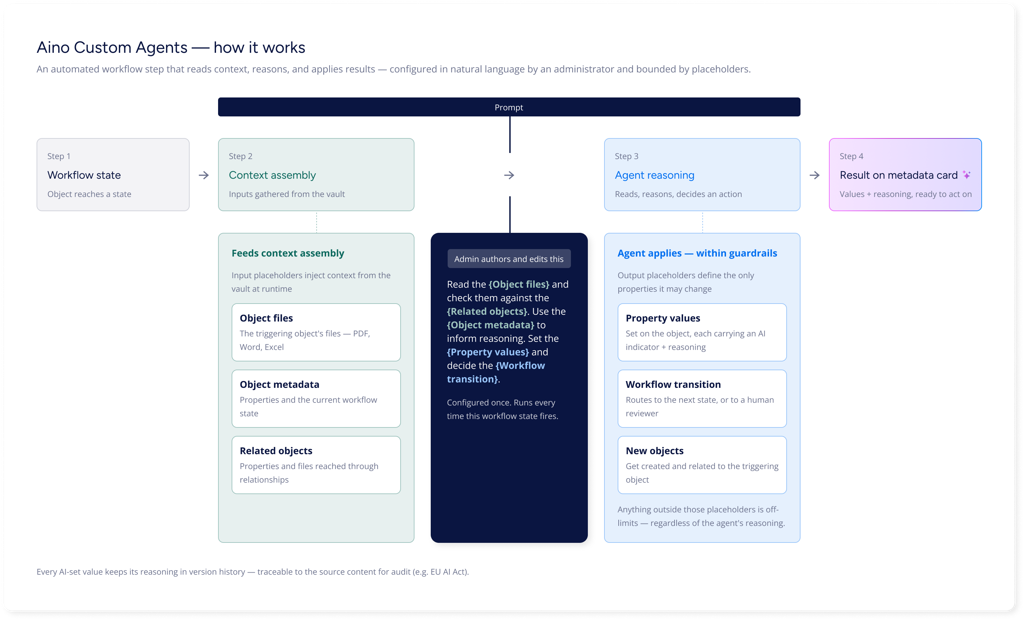
Behind that experience, an administrator has configured the agent once. Administrators configure agents in the Automation tab of any workflow state in M-Files Admin. A prompt describes the task in natural language. Input placeholders inject context from the vault, including the triggering object's files, its metadata, and properties and files from related objects. Output placeholders define exactly which properties the agent is allowed to change. Anything outside those placeholders is off-limits, regardless of the agent's reasoning. One agent per workflow state; the same agent can be reused across multiple states and workflows.
What this looks like in practice
Here are three scenarios where the combination of structured content and a knowledge graph changes the quality of the answer.
Subcontractor invoice verification
Before a subcontractor invoice can be approved, it needs to be verified: are the line items covered by the contract? Do the rates match the rate schedule? Is the total within what the contract authorizes?
Done manually, this means locating the right contract version and reading it side by side against the invoice, for every invoice that comes in. At high volume, the process becomes a bottleneck. Discrepancies slip through when reviewers are moving fast or are unfamiliar with the project history.
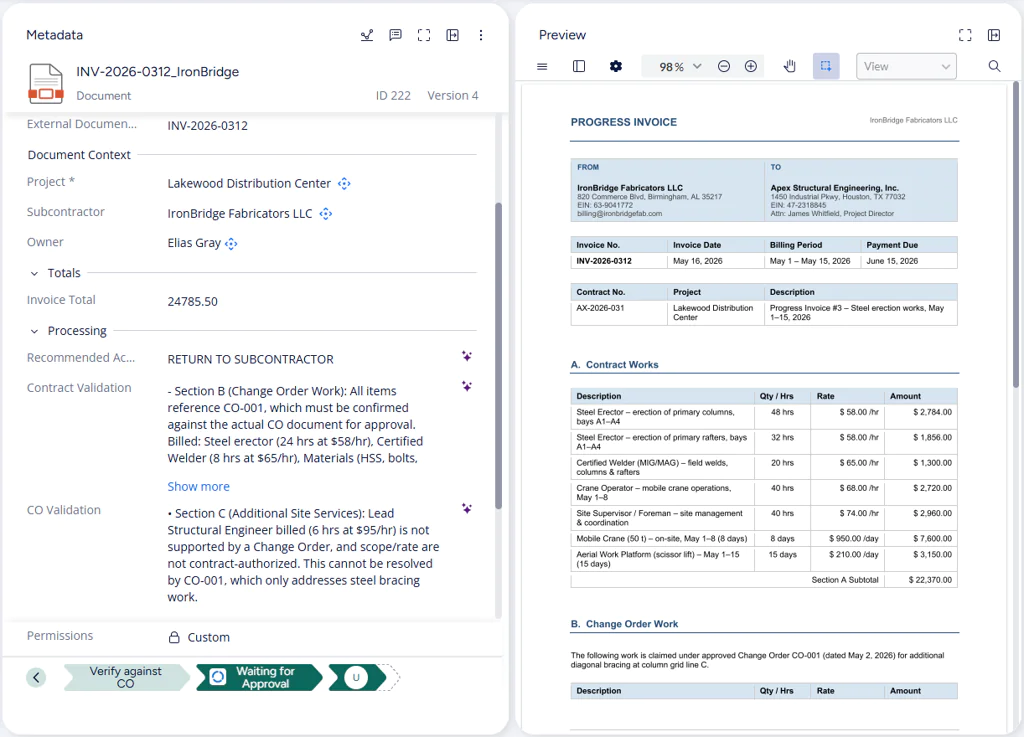
When the invoice enters the verification state in its workflow, the agent reads both the invoice and the subcontract. The subcontract is retrieved from the subcontractor's related documents in the vault, not by a search query that may or may not find the right version, but through an explicit relationship that is always there. It records its findings: which line items are confirmed, which are not, and what the discrepancy is. It then routes the invoice directly to a human approver.
What changes is what the approver receives: a structured set of findings already assembled, covering what was billed, what the contract allows, and a recommended next action. The approver exercises judgment on what the agent has surfaced. They do not need to search for the contract or read both documents from scratch. Every invoice gets the same check, in the same time, regardless of reviewer workload or familiarity with the project.
Vendor risk scoring
Most organizations review vendors on a regular cycle, but in practice those reviews are inconsistent. Quality records, contract status, certification expiry, open non-conformances: the signals exist across the system, but assembling them takes time, and reviews get skipped when workload is high. A vendor with compounding risk factors may look fine to a reviewer who only checked one source.
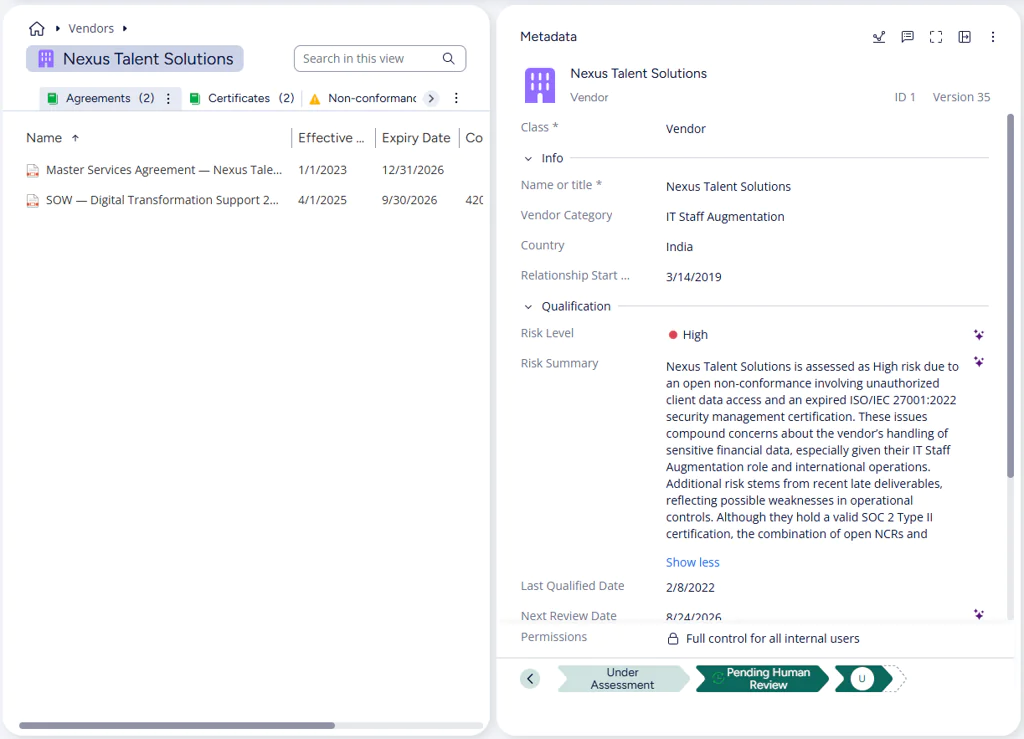
This use case makes the M-Files difference concrete. A user with a chat tool would need to manually pull together non-conformance records, check contract status, look up certification expiry, and then paste all of it into a prompt, for every vendor, every review cycle. The agent gets all of that assembled automatically, because the information already exists as connected objects in the vault. There is no document to paste. Every input (vendor category, relationship start date, non-conformance records, contract status, certification expiry) comes from metadata and object relationships resolved at runtime. The agent traverses those relationships, assembles the full picture, and reasons over it.
The scoring prompt applies deterministic floor criteria: an expired certification or an open non-conformance always triggers at least a Medium risk rating. An escalation instruction lets the agent reason about compound risk when the combination or context of findings warrants a higher level. The agent records a risk level, a brief explanation of its reasoning, and a next review date calculated from the schedule defined in the prompt. Vendors rated High move to a human review state; all others return to Active automatically and are scheduled for their next assessment. Every vendor in the system gets a full assessment on every cycle, not just the ones someone had time to look at.
Incoming inspection: measurement verification
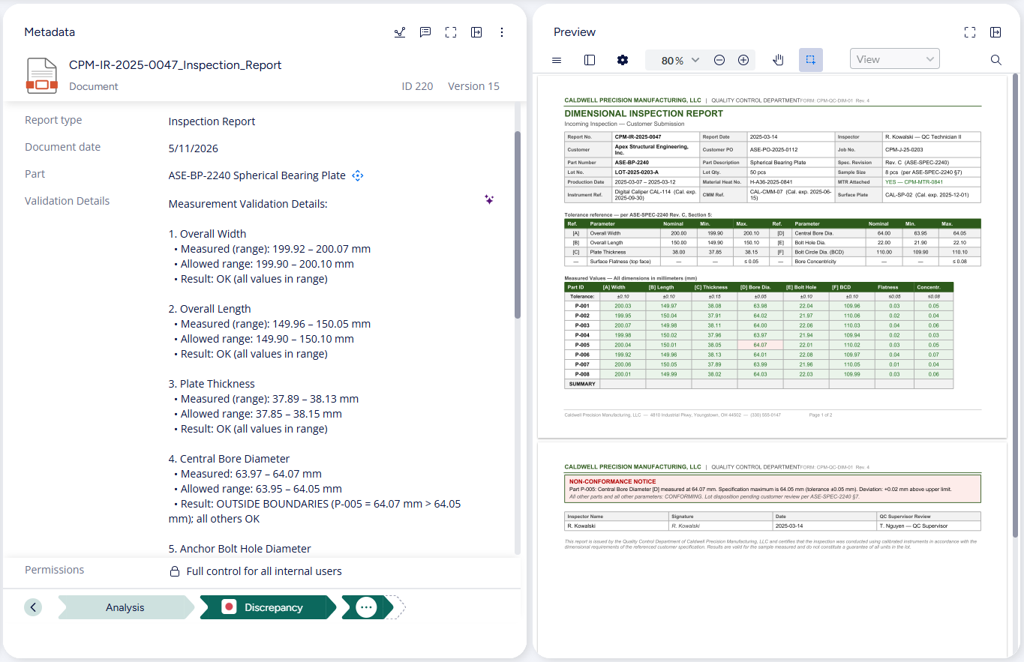
When a supplier delivers a batch of products, they include an inspection sheet documenting the measured values for that delivery. Before the batch can be accepted, every measurement needs to be found, compared against the allowed tolerance, and any deviation or missing value flagged. The task is detail-heavy and repetitive, and fatigue errors are exactly the kind of errors that let a non-conforming batch through.
Done manually, the reviewer reads the inspection sheet, locates the product specification, and cross-references every measurement one by one. When inspection volume is high, or the same person reviews many similar sheets in sequence, the process becomes both a bottleneck and a liability.
When the inspection sheet enters the Analysis state in its workflow, the agent reads it alongside the product's design document, retrieved through the object relationship chain in the vault. A reviewer using a generic AI tool would need to find the right specification, work out which measurements apply to this product type, and feed all of it into a prompt. Here, the vault already knows: the product links to its design document, and the product's metadata defines which measurements are required for incoming inspection. The agent checks that exactly those measurements are present in the inspection sheet and within the tolerances defined in the specification. Adding a new product means creating a design document and setting the required measurements on the product record. The agent configuration itself never needs to change.
The agent produces a structured validation list: every required measurement, its allowed range from the design document, and whether it is within tolerance, outside it, or missing from the inspection sheet. Based on its findings, it drives the workflow transition directly. Sheets where all required measurements are present and within tolerance are accepted automatically; any deviation or missing value routes the sheet to a human reviewer for resolution. No queue, no manual routing decision.
Governed AI, explainable by design
Every agent action runs within guardrails set by the administrator. Permissions follow state: the agent sees only what the prompt defines it to see, and changes only what it has been permitted to change. The output placeholders in the prompt define the complete set of properties the agent can change. No property outside that list can be modified, regardless of what the agent's reasoning might suggest.
What makes this more than a configuration safeguard is what happens after the agent acts. Every value the agent sets is marked on the metadata card with an AI indicator. Clicking it opens the agent's reasoning, the explanation of why that value was chosen, grounded in the source content the agent read. A contract manager can see exactly why an invoice line item was flagged. A quality engineer can verify what the agent compared a measurement against. A procurement officer can read the full basis for a vendor's risk rating before acting on it.
That reasoning stays accessible in version history even after the value has been changed or overridden by a human. Decision capture is a first-class artefact: the original AI reasoning and its justification remain part of the record, not just the outcome.
For organisations operating in regulated environments, this matters in a specific way. The EU AI Act requires that AI systems used in professional decision-making be transparent, explainable, and auditable. M-Files' persistent reasoning architecture directly addresses those requirements: every AI-driven metadata value has a traceable explanation, tied to the source content, stored with the object, and accessible to anyone who needs to review it. The audit trail is not a separate report. It is the product, built into the document record.
As the agent's accuracy becomes clear over time, workflows can evolve. A human review step that made sense at the start may become unnecessary once the agent's recommendations have proven reliable, and the structured output the agent produces makes that transition straightforward whenever the organisation is ready for it.
The work that used to wait for someone is now the work that gets done first, with a complete record of how and why.
What this means for your organisation
Every invoice gets the same verification. Every vendor gets a full risk assessment on every cycle. Every inspection sheet is checked against the specification before a human ever sees it. The work scales without scaling the team, and every decision the agent makes is explainable, traceable, and auditable from the document record itself.
Available now in Beta
M-Files Custom Agents is available in Beta as of the June 24, 2026 release. The M-Files Custom Agents - Administrator Guide takes you from setup to your first configured agent.
Latest Articles
Browse Topics
Resources

See M-Files in Action