
What Is Metadata? Business Examples, Types, and Benefits

Updated: October 7, 2026
Metadata is data about data: information that describes and gives context to other information. In your business, metadata is what tells you a file is a signed contract, which customer it belongs to, whether it's still active, and when it renews. That context makes documents and records easier to find, secure, govern, and use for your business.
Without metadata, your contracts, invoices, drawings, and policies are just files in folders. With metadata, that same document becomes something your business can actually search, route, protect, and act on.
The National Information Standards Organization (NISO) defines metadata as "structured information that describes, explains, locates, or otherwise makes it easier to retrieve, use, or manage an information resource." You'll see it everywhere, from the date on a photo to the sender of an email. This guide focuses on business metadata, the information organizations use to manage documents and records at scale.
Data vs. metadata: what's the difference?
Data is the content itself: the words in a contract, the figures in an invoice, the lines in an engineering drawing. It's what people create, read, and edit.
Metadata is the information that describes that content. It doesn't change what a document says, but metadata tells you what the document is, where it came from, how it relates to other information, and how it should be handled.
Take a signed contract as an example. The text of the agreement is the data. The customer name, contract type, status, owner, execution date, and renewal date are the metadata. You can't learn the actual terms of the deal from the metadata, but you can use the metadata to find the right contract, know whether it's current, and decide who should be able to see it.
Data and metadata work together. Data gives information its substance, and metadata gives it context. Without metadata, people have to open files one by one to learn what's inside, and systems can't automatically route, secure, or retain them. Without data, metadata has nothing to describe.
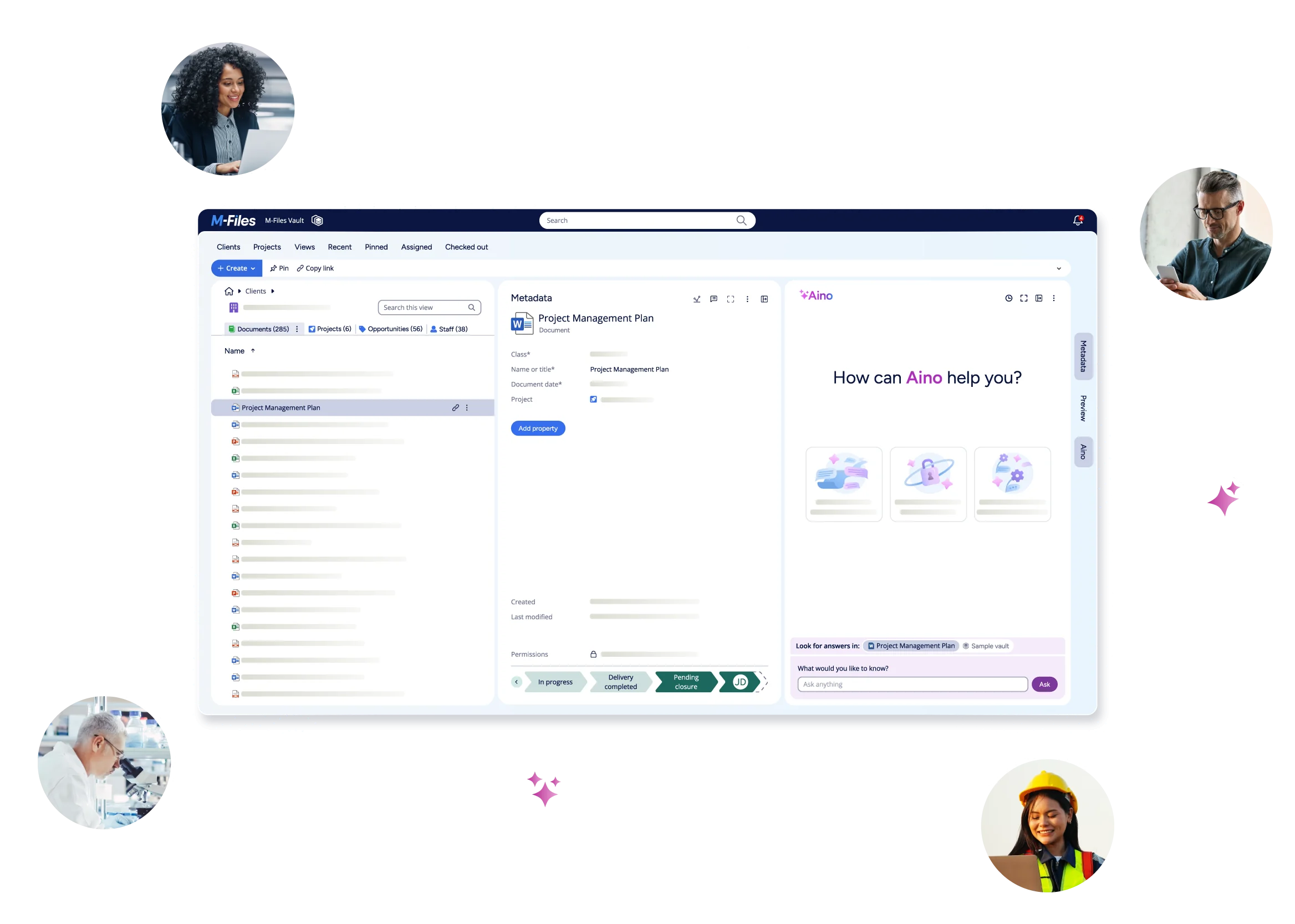
Some metadata is captured automatically, such as the date a file was created or who last edited it. Business metadata, such as customer, contract type, or approval status, usually comes from people, workflows, or connected business systems. Platforms like M-Files add business metadata automatically: AI analyzes a document's content, identifies details such as a case number, customer, or document type, and fills in the related properties so people don't have to enter them by hand. A book works the same way: the story is the data, while the title, author, publication date, and table of contents are the metadata.
Examples of metadata
Your business documents carry metadata that reflects how the organization works:
- Contracts: customer, contract type, status, owner, execution date, and renewal date
- Invoices: supplier, amount, due date, and approval status
- Engineering drawings: project, revision, discipline, and approval status
- Policies and procedures: owner, effective date, version, and retention category
- Customer records: account, case, region, and classification
You also use metadata every day outside of work. A photo carries the camera model, date, and location. An email carries a sender, recipient, and subject line. A file carries an author, date created, and file size. A library book carries a title, author, and subject. The idea is the same: information about the information makes it easier to find and use.
Types of metadata
Metadata falls into three main types: descriptive, structural, and administrative. Many systems also track technical and preservation metadata.
Descriptive metadata
Descriptive metadata identifies information and makes it easier to find. Typical examples are title, author, keywords, and summary. In your business, it's the customer, project, or document type attached to a file.
Structural metadata
Structural metadata shows how information is organized and how pieces relate to each other, like the chapters in a book. In business, it describes how an agreement connects to its amendments, how an invoice links to a purchase order, or how a project plan relates to its deliverables.
Administrative metadata
Administrative metadata helps manage information. It covers ownership, access permissions, approval status, and retention periods, along with rights information in some settings. For example, it can record who owns a policy, who can edit it, and how long the organization must keep it.
Technical and preservation metadata
Technical metadata describes a file's format, encoding, and storage details. Preservation metadata supports long-term access, such as backup history and format migration. Regulated industries rely on both to keep records usable for years.
Why folders aren't enough: a lease agreement example
Folders can tell you where a document lives, but not what it is. Imagine a real estate company stores a signed lease agreement as:
Lease Agreements → Lease Agreement-125 Main Street.pdf
At first glance, this seems logical. But what happens when someone needs to find:
- All lease agreements for a specific tenant?
- Every agreement signed in July?
- Documents related to a particular property?
- Leases that expire within the next 90 days?
Folder names and file names rarely contain all the information needed to answer these questions.
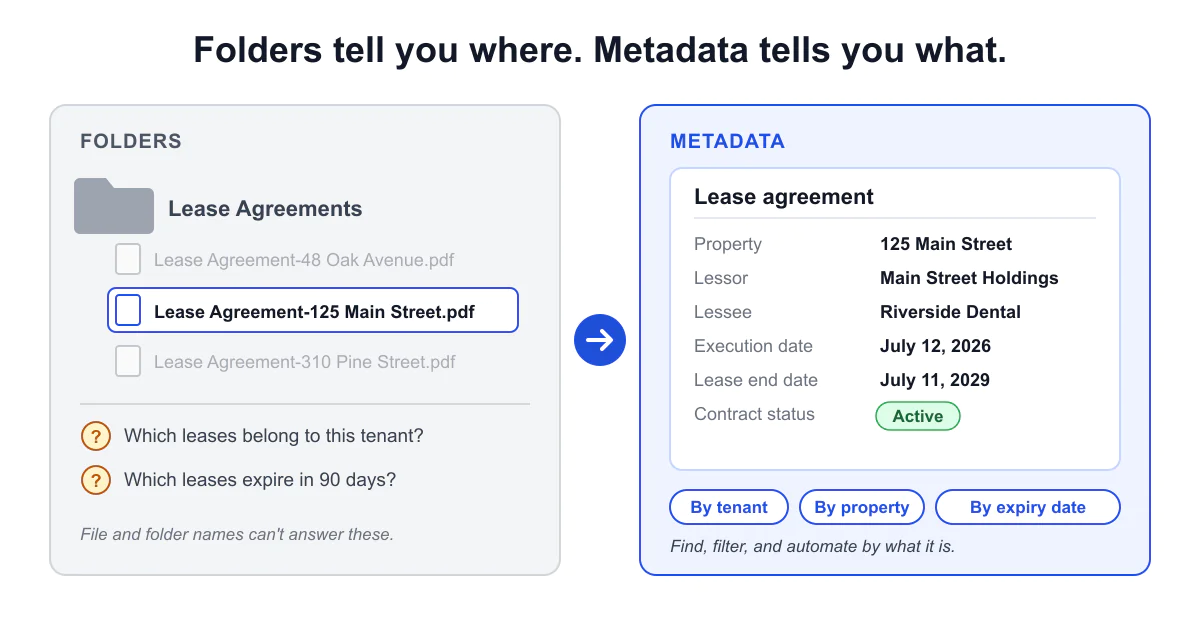
Metadata solves this by classifying the document with properties such as property name, property address, lessor, lessee, execution date, lease start date, lease end date, and contract status. Now users can find and work with documents based on its characteristics and business relevance rather than its location. M-Files helps you apply this same approach metadata-driven document management systems.
Metadata in action: how organizations use it
Organizations in many industries put the same idea to work, using metadata to connect documents to the customers, projects, assets, and processes they support.
Real estate and property management
Newsec, a property management and real estate advisory firm in the Nordics and Baltics, uses M-Files to manage the full lifecycle of lease agreements, from drafting and signing to archiving. Because information is tied to what it represents rather than where it's stored, property, contract, and project information stays easy to find and up to date. Workflows also send automatic reminders for recurring tasks such as fire extinguisher maintenance and regulatory inspections.
Engineering and manufacturing
At Katoni, an engineering consultancy, each project is set up with phases and predefined document placeholders. Engineers drop a file onto the right object, and the system assigns metadata automatically, which supports consistent naming and numbering. Documents then move through approval workflows, and a full audit trail shows who reviewed and approved what.
Backyard Discovery, an outdoor products manufacturer, uses metadata and workflows to manage drawings, bills of materials, and engineering change orders. Change orders that once took one to two weeks now take about three days. The team also pulls details such as the cubic meters of wood from bills of materials into metadata, so the team can pull up a costing view immediately.
Quality and compliance
Protolabs, a digital manufacturer, connects documents, suppliers, risks, corrective actions, products, and processes through metadata. That structure supports document control and audit readiness across multiple sites. The company migrated about 18,000 safety data sheets in three days and is now exploring AI to populate its metadata.
Accounting and advisory
Before adopting M-Files, accounting firm BonsenReuling had inconsistent metadata. Documents were sometimes tagged to the wrong customer, and employees filed support tickets to find them. Today the firm organizes documents by customer, process, and document type. As its ICT manager put it, "The deciding factor was the philosophy behind M-Files: not where the document is stored, but what the document is."
Intellectual property and legal services
Berggren, an intellectual property law firm, manages more than 7 million documents. It connects each one to clients, cases, deadlines, intellectual property rights, and countries. M-Files AI can identify a case number and use it to populate additional metadata values automatically, which reduces manual work and improves consistency.
Why metadata is the foundation of modern document management
Modern document management systems like M-Files use metadata as the primary way to identify, organize, and manage information. Rather than relying on folder structures, metadata lets your organization classify information by its purpose, context, and relationship to other business information.
That changes how your employees find information. Instead of navigating complex folder structures, users can search by criteria that matter to them, such as customer, project, contract type, department, date, location, or status. Because metadata identifies documents according to what they are, documents become easier to find, access, and manage across repositories. It's also one of the key principles behind modern enterprise content management strategies.
The same approach makes your information easier to govern, automate, and manage throughout its lifecycle, while supporting collaboration, compliance, and business efficiency. Learn more about the benefits of a metadata-driven document management system.
Metadata across the information lifecycle
Metadata does its work at every stage of a document's life:
- Creation: systems capture metadata automatically, and users add business details such as customer or contract type.
- Storage and organization: metadata classifies information so people can find it without knowing a folder path.
- Access and retrieval: users search and filter by metadata instead of browsing.
- Retention and archiving: metadata drives retention periods and disposition so records stay compliant.
If you don't capture metadata when you create content, you quickly end up with a collection of business documents that are difficult to manage, find, and retrieve.
Metadata supports workflow automation
Metadata can also drive business processes. When your business documents are properly classified, organizations can automatically:
- Route documents for approval
- Trigger notifications
- Apply retention policies
- Assign permissions
- Enforce review cycles
- Launch business workflows
For example, when a contract's status changes to "Pending legal review," the system can route your legal team and notify the owner. This reduces manual work and helps ensure teams follow processes consistently. It's the foundation of M-Files document workflow automation and document-centric process improvement.
Metadata improves governance, compliance, and auditability
One of the most important benefits of metadata is its role in information governance. Metadata helps you:
- Apply your records management policies
- Support regulatory compliance
- Control who can access which information
- Track document history
- Maintain audit trails
- Manage information throughout its lifecycle
Metadata can even drive security. At P38, Inc., a Canadian company with manufacturing, engineering, and energy businesses, permissions are assigned automatically based on factors such as department, customer, and document classification, and retention policies are enforced automatically.
By providing structure and accountability, metadata helps organizations reduce risk while keeping information secure, traceable, and governed. Effective metadata management is also fundamental to security and compliance initiatives.
The cost of ignoring it is real. According to Gartner, enterprises that don't take a metadata-driven approach to IT modernization can spend as much as 40% more on data management.
Metadata improves AI readiness
As organizations adopt AI, high-quality metadata matters even more. AI systems depend on information that's well organized, connected, and governed. Metadata helps make information:
- More discoverable
- Better classified
- Easier to understand
- Permission-aware
- More trustworthy for AI-powered experiences
Without context, AI can struggle to identify which information is relevant, current, or appropriate to use. Metadata gives your AI tools more relevant, permission-aware context to work with, which supports AI-powered search, analytics, and automation. Governance supports AI readiness, but it doesn't guarantee more accurate answers on its own.
Mikko Pippuri of Berggren sees it the same way. In the words of its digital lead, "Good metadata has become even more important in the AI era. It helps us provide the right context, improve the quality of responses and avoid processing unnecessary information."
Metadata also supports enterprise AI initiatives and integrations such as Microsoft Copilot.
Is your content ready for AI? Watch the on-demand webinar with Forrester, Microsoft, and M-Files to learn what makes business content ready for Microsoft 365 Copilot and AI agents.
Metadata management best practices
Metadata is only as useful as it is consistent. A few habits keep it reliable:
- Define clear goals. Decide whether you're solving for search, compliance, automation, or all three.
- Use consistent properties and values. Standardize names, choice lists, and tagging rules so "Acme Corp" isn't entered four different ways.
- Assign ownership. Make someone responsible for each metadata property and its quality.
- Automate where you can. Capture metadata automatically at creation to reduce manual entry and errors.
- Review regularly. Audit metadata to keep it accurate and aligned with changing policies and regulations.
Many organizations also align with established standards such as Dublin Core, a widely used set of elements for describing digital resources, and ISO 15836, which builds on it.
How M-Files uses metadata to improve document management in Microsoft 365
M-Files improves SharePoint and Microsoft 365 by adding business context. As an enterprise document management system built for Microsoft 365, M-Files uses a metadata-driven approach to identify and organize your documents by what they are rather than where they're stored. That context strengthens governance and helps you protect sensitive information, including personally identifiable information (PII).
M-Files builds on SharePoint without replacing it, adding document control, version management, document workflow automation, records management, and governance. If you're looking for stronger control over business-critical documents, M-Files gives you a way to add it to the SharePoint you use today. Because M-Files integrates natively with Microsoft 365, your employees keep working in familiar tools such as Word, Excel, PowerPoint, Teams, and Outlook.
M-Files helps you find information faster by connecting documents to customers, contracts, projects, suppliers, approvals, and business processes. It also reduces manual work and applies governance consistently. M-Files works with Microsoft Purview, which supplies retention, sensitivity, and information protection policies, and adds the business context that helps apply those protections to supported content. That same context gives Microsoft Copilot and AI agents more discoverable, permission-aware, and context-rich information.
Explore how metadata supports:
- Microsoft 365 document management
- SharePoint document management
- Microsoft Teams document management
- Microsoft Outlook content management
- Microsoft Purview governance
- Microsoft Copilot integration
M-Files adds business context to information across Microsoft 365, so you can improve productivity, strengthen governance, and build the trusted information foundation you need for automation and AI.
Metadata FAQs
Conclusion
Metadata is far more than information about information. It provides the structure, context, governance, and intelligence organizations need to manage business information effectively.
By connecting content to business processes, people, and systems, metadata helps organizations improve information discovery, workflow automation, compliance, records management, and AI readiness. That makes it a foundational component of modern digital business.
Want to see how M-Files can bring order, control, and context to your business documents in Microsoft 365 using metadata?
Have questions first? Contact us
Latest Articles


Browse Topics
Resources

See M-Files in Action