

What Is AI Readiness? A Guide to Preparing for AI
What Is AI Readiness? A Guide to Preparing for AI


AI readiness is an organization's ability to adopt, govern, and scale artificial intelligence effectively. It includes having the right strategy, technology, skills, security, governance, processes, and information foundation to support reliable and responsible AI use.
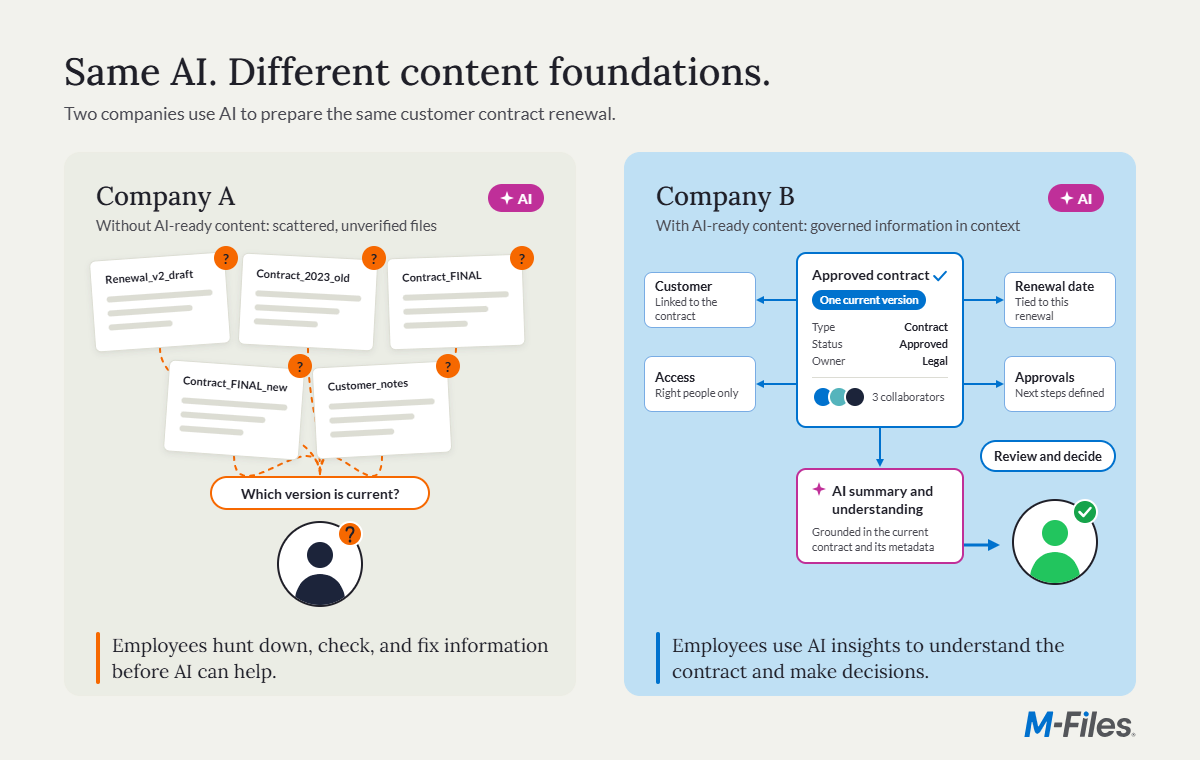
If your business uses generative AI and AI agents, readiness goes beyond choosing an AI platform. AI systems depend on the information they can access. If your business content is outdated, fragmented, poorly organized, overshared, or missing important context, you can struggle to get consistent, trustworthy results from AI.
Microsoft's guidance for Microsoft 365 Copilot emphasizes a secure, well-governed information foundation, including addressing oversharing, establishing guardrails, and meeting regulatory requirements.
Not sure where your organization stands?
Take the 5-minute AI Readiness Assessment to get your readiness level and
personalized next steps.
Why is AI readiness important?
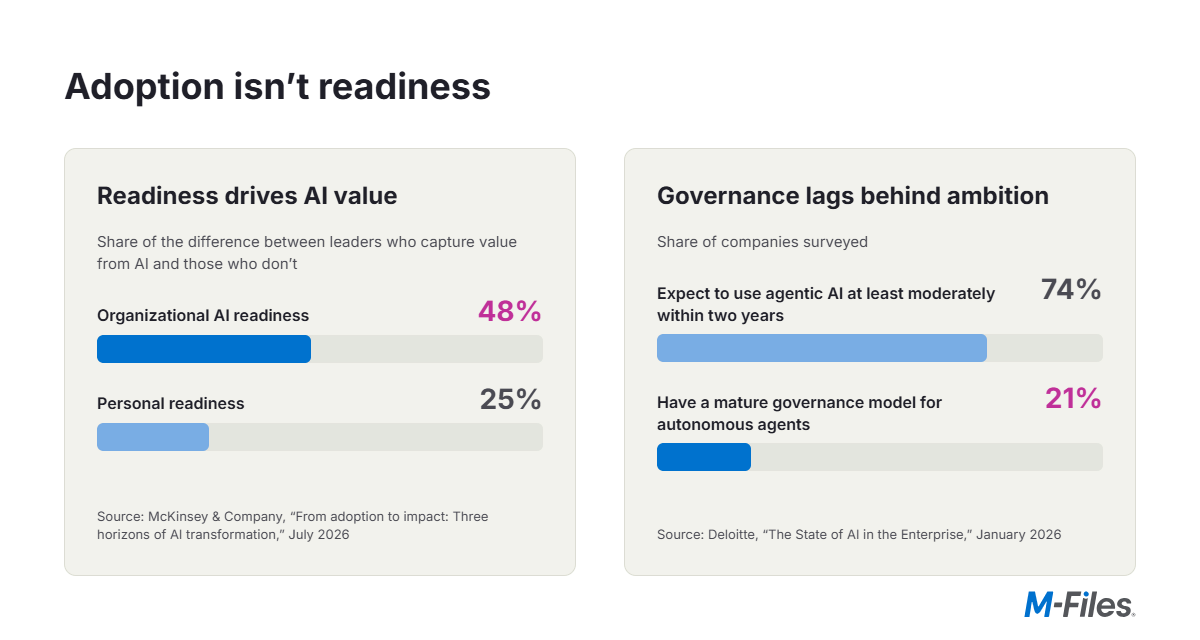
AI adoption is accelerating, but adoption and readiness aren't the same thing. In McKinsey's 2026 research on AI transformation, organizational AI readiness accounted for 48% of the difference between leaders who reported capturing value from AI and those who didn't. That's nearly twice the share explained by personal readiness.
Governance is lagging too. Deloitte found that while 74% of companies expect to use agentic AI at least moderately within two years, only 21% have a mature governance model for autonomous agents.
As your business moves from experimenting with AI to embedding it in everyday work, the quality, governance, security, and context of the information behind it matter more than ever. AI can dramatically speed up how your employees find, summarize, analyze, and act on information. It can also make existing information-management problems more consequential.
For Microsoft 365 Copilot, Microsoft identifies data security, AI security, compliance, and privacy as key governance considerations. Its guidance recommends identifying potentially overshared data and limiting access so sensitive information stays protected.
AI readiness starts by making sure the information behind your AI is as trustworthy as the AI experience you want to create.
What can prevent your business from being AI-ready?
AI doesn't fix underlying information problems. It amplifies them. Many AI problems begin as information management problems. Common barriers include:
- Fragmented information. Your business-critical content may be spread across repositories, legacy systems, email, and collaboration tools such as Microsoft SharePoint, Microsoft Teams, and Microsoft Outlook.
- Outdated or duplicated content. Old versions, duplicates, and expired documents make it harder for your people and AI to find the authoritative source.
- Weak metadata and classification. Your information may lack the structure or context to explain what it is or how it relates to your business.
- Oversharing. Your employees may still have access to information they no longer need. Microsoft recommends identifying and limiting potentially overshared data as part of governing Copilot.
- Inconsistent governance. Retention, permissions, ownership, and lifecycle rules may depend too heavily on manual effort.
- Disconnected processes. Documents get separated from the workflows, decisions, people, and records that explain their purpose.
What are the key components of AI readiness?
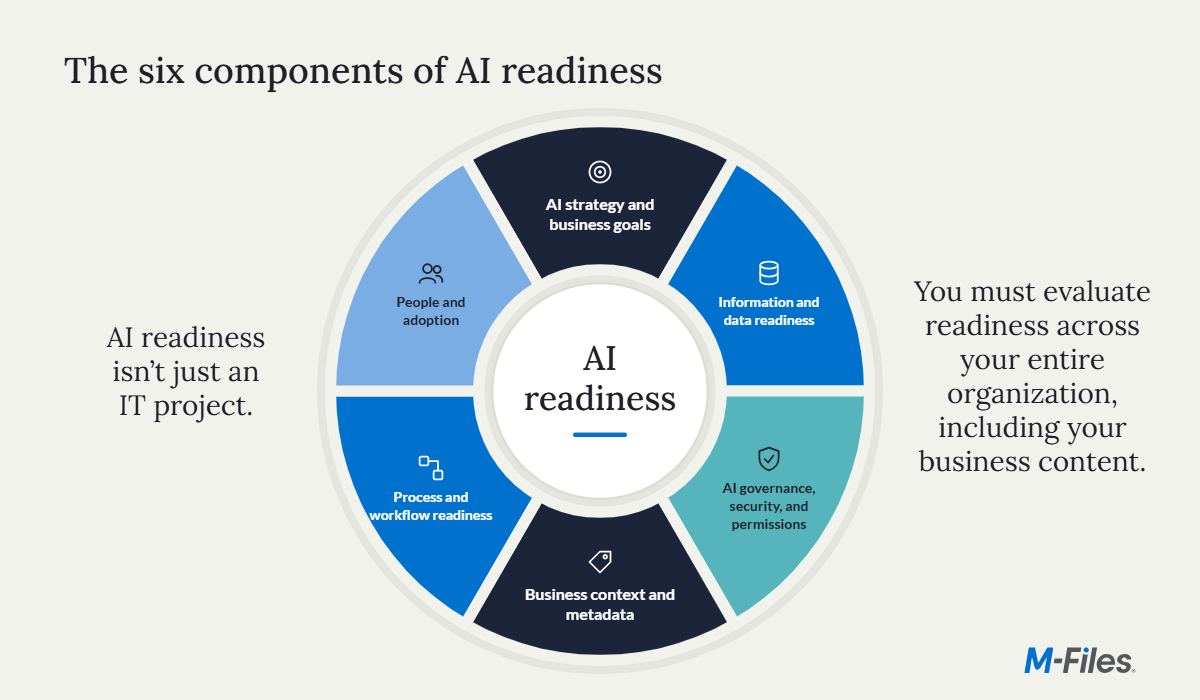
Evaluate enterprise AI readiness across your whole organization rather than treating it as a single IT requirement. Six components matter most.
-
AI strategy and business goals
Start by defining what you expect AI to accomplish for your business. That means identifying meaningful use cases, establishing ownership, connecting AI initiatives to business objectives, and defining how you'll measure success.Instead of simply asking, "Where can we use AI?", ask, "Which business processes and information-intensive activities can AI meaningfully improve?"
-
Information and data readiness
AI needs access to useful information. Your information should be relevant, current, accurate, discoverable, appropriately classified, connected to meaningful context, and governed throughout its lifecycle.This matters most in document-intensive organizations, where critical knowledge often lives inside contracts, project documentation, client records, policies, drawings, correspondence, reports, and other unstructured content.
-
AI governance, security, and permissions
AI shouldn't make information available to someone who shouldn't have access to it. That means you need to understand:- who can access your information
- where sensitive information resides
- whether content is overshared
- how information is classified
- how retention and lifecycle rules are applied
- how AI usage aligns with your organizational and regulatory requirements
This is especially important with Microsoft 365 Copilot. Microsoft recommends assessing oversharing risks and taking corrective action as part of its security and governance framework.
For organizations using Microsoft Purview, M-Files can also extend Microsoft-native information protection to supported business-critical content, connecting governance with the metadata and business context M-Files maintains around that information.
-
Business context and metadata
Finding a document isn't the same as understanding it. Instead of asking, "Where is the file?", the better question is, "How is this connected to my work?" Your information becomes far more useful when its meaning and relationships are clear:- Which customer does this document belong to?
- Which project is it associated with?
- Is this the approved contract?
- Who owns it, and what's its current status?
- What process is it part of, and which other records relate to it?
Metadata and relationships provide this business context.
-
Process and workflow readiness
AI readiness isn't only about answering questions. You'll likely want AI and agents to support business processes, too. That means your information needs to stay connected to workflows, approvals, ownership, status, related records, business rules, and lifecycle controls.This connection creates the foundation for moving beyond AI-assisted search and summarization toward governed, AI-enabled work.
-
People and adoption
Technology and content alone don't make your organization AI-ready. Your employees need to understand where AI is appropriate, how to use it responsibly, how to evaluate AI-generated output, and which processes can benefit from it.Clear ownership, training, policies, and change management should accompany every AI deployment.
What is AI data readiness?
AI data readiness, sometimes called data readiness for AI, describes whether the information available to an AI system is organized, accessible, governed, protected, and useful enough for its intended purpose.
For enterprise AI, that includes structured data as well as unstructured business content such as documents, emails, contracts, policies, reports, and project files.
Your organization may be technologically ready to deploy an AI tool, but your business information isn't yet ready to support it. That gap is one of the most important AI readiness issues to address.
What is the difference between AI readiness and AI maturity?
AI readiness asks whether your organization has the foundation it needs to use AI successfully. AI maturity describes how extensively and effectively you're already using AI across the organization.
You can have strong technology infrastructure but low AI readiness if your information is poorly governed or your employees aren't prepared to use AI.
Likewise, you can start with isolated AI pilots and progressively increase maturity as your governance, content quality, processes, adoption, and use cases improve. That's why it helps to treat AI readiness as a journey rather than a yes-or-no question.
How do you assess AI readiness?
A practical AI readiness assessment examines six areas. Ask these questions about your organization:
Strategy
- Does your organization have clearly defined AI use cases?
- Do those use cases connect to measurable business outcomes?
- Is there clear ownership for your AI initiatives?
Information
- Can your employees reliably find authoritative information?
- Is your important content current and accurate?
- Is critical information scattered across multiple repositories?
- Can you identify duplicates, obsolete information, and unmanaged content?
Context
- Is your information classified consistently?
- Does it have useful metadata?
- Can documents be connected to your customers, projects, contracts, assets, and processes?
- Can your users and systems tell the right document from a merely relevant one?
Governance and security
- Are your permissions accurate?
- Do you know where sensitive information resides?
- Is content overshared?
- Are retention and lifecycle policies applied consistently?
Processes
- Are your important document processes controlled?
- Are reviews and approvals automated where appropriate?
- Does information keep its governance and context as it moves through a business process?
AI adoption
- Are your employees trained to use AI appropriately?
- Have you identified valuable AI use cases?
- Can your AI initiatives move from isolated pilots into repeatable business processes?
The goal isn't simply to generate an AI readiness score. It's to identify the gaps most likely to keep AI from delivering trustworthy business value.
Using the M-Files AI readiness framework
If you want a structured way to evaluate these areas, the M-Files AI Readiness Model groups them into five dimensions: content and AI strategy, metadata and classification, governed knowledge foundation, lifecycle and process automation, and AI depth and activation. It also shows which of five maturity stages your organization is in, from Scattered to Sovereign, so you can see where you stand today and what to improve next.
The 10-question AI Readiness Assessment takes about five minutes and gives you your readiness level, personalized recommendations, and next steps.
How do you prepare your business content for AI?
Preparing content for AI means improving the information foundation behind the technology. AI-ready content isn't simply digitized content. It's information your people and AI can find, understand, govern, and use in the right business context.
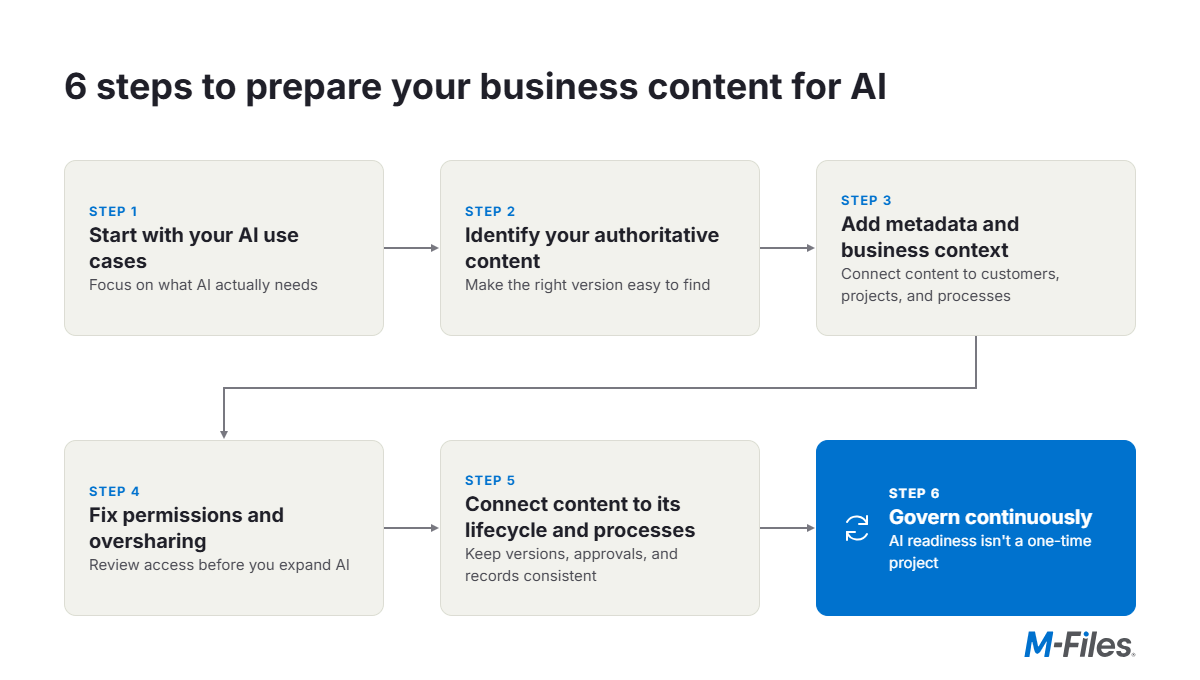
- Start with your AI use cases. Identify the business processes and information AI actually needs, rather than trying to prepare everything equally.
- Identify your authoritative content. Address outdated, duplicated, poorly classified, or disconnected content so the right version is easy to recognize.
- Add metadata and business context. Classify content consistently and connect it to the customers, projects, contracts, assets, and processes it supports.
- Fix permissions and oversharing. Review who can access what, where sensitive information lives, and what's overshared before you expand AI use. Microsoft recommends identifying and remediating oversharing as part of a secure, governed Copilot foundation.
- Keep content connected to its lifecycle and processes. Manage versions, approvals, retention, and records consistently, and keep documents linked to the workflows, owners, and decisions they belong to.
- Govern continuously. AI readiness isn't a one-time project. Your information keeps changing, so permissions, lifecycle controls, and content quality need ongoing management.
How M-Files helps prepare your business content for AI
M-Files helps you transform your business-critical content into trusted, governed, AI-ready information.
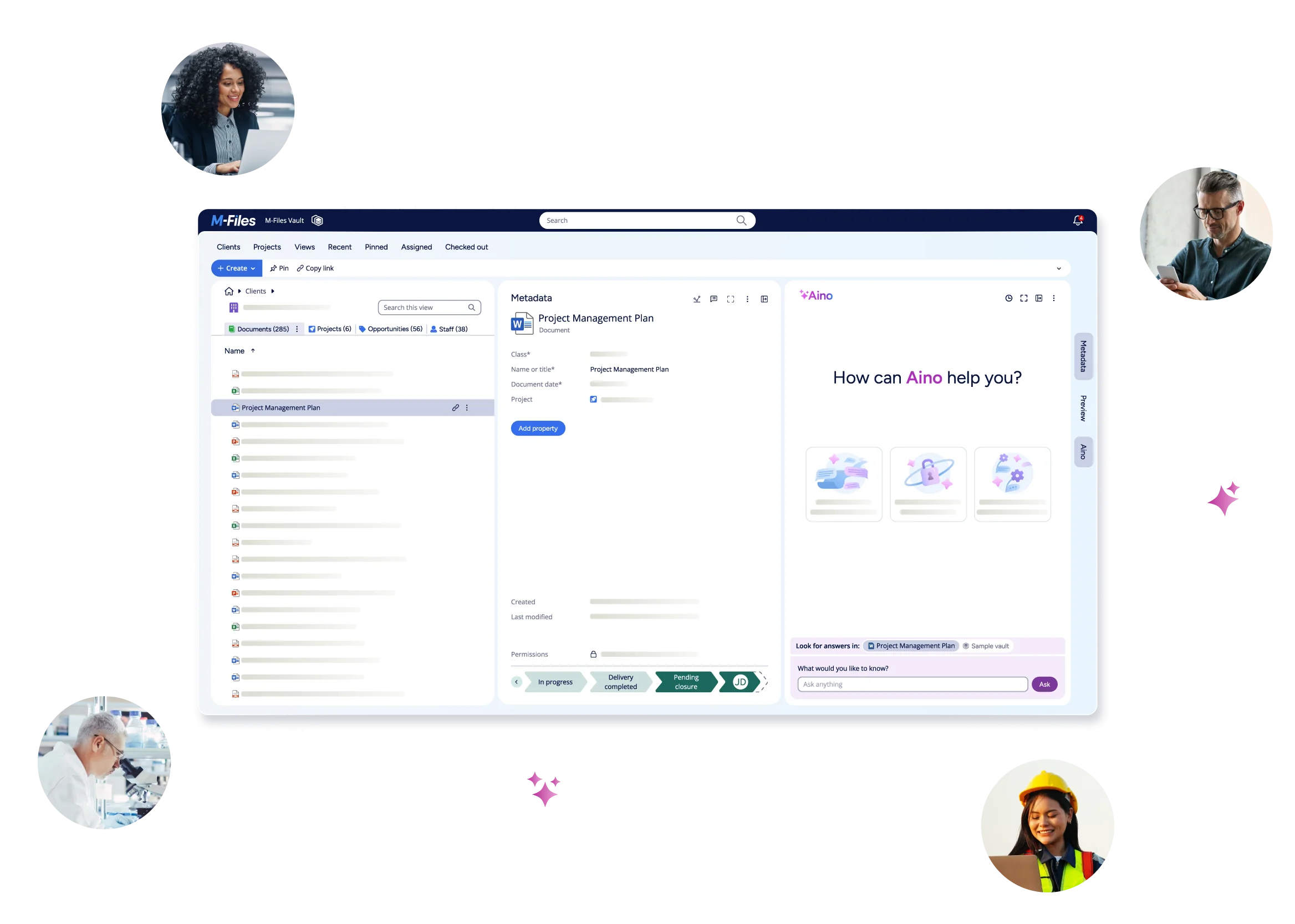
Instead of organizing information around where files are stored, M-Files connects your documents to the customers, projects, contracts, assets, and processes they support. Metadata, relationships, permissions, workflows, and lifecycle controls preserve the business context around that information. That gives your organization a stronger information foundation for AI.
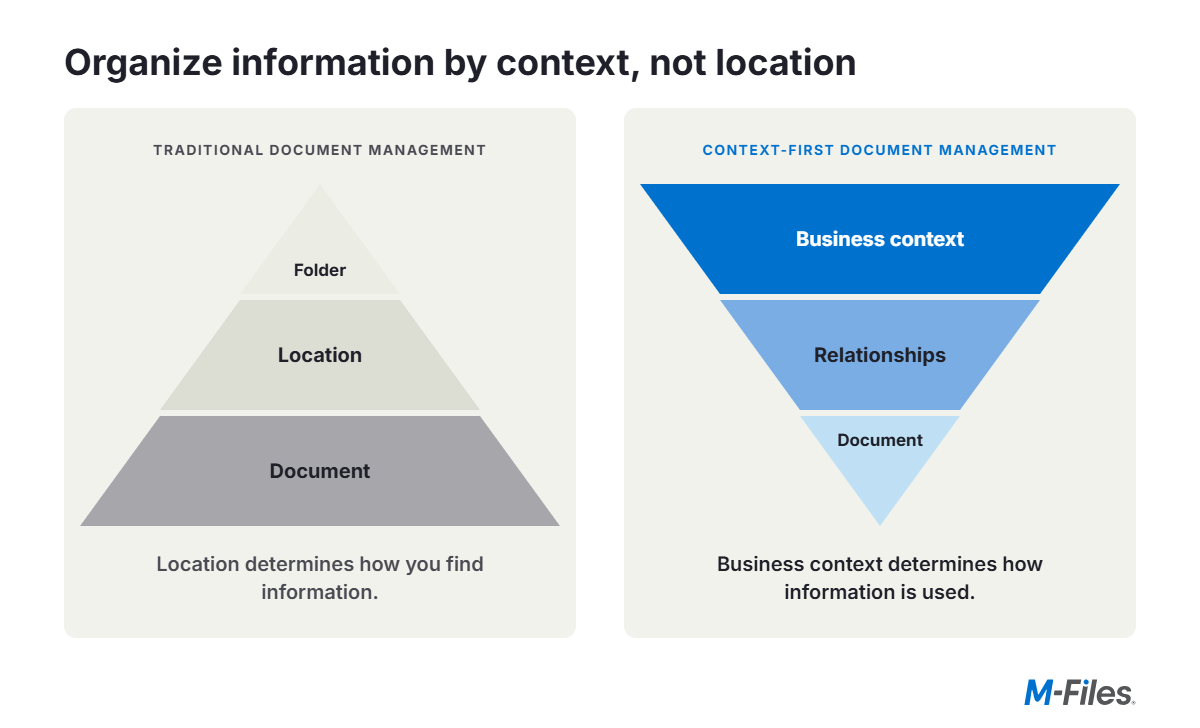
With M-Files, you can:
- Add business context. Connect documents to the business entities and processes that give them meaning.
- Structure information with metadata. Use consistent metadata and classification to make information easier to find, understand, manage, and use.
- Maintain governance and permissions. Keep permissions, lifecycle controls, retention, and versioning connected to your business-critical content.
- Automate document-intensive processes. Connect information to workflows, approvals, owners, and process stages instead of leaving documents isolated from how work gets done.
- Extend document management across Microsoft 365. M-Files complements Microsoft 365 with metadata-driven document management, business context, governance, and workflow automation.
Your teams can keep working in familiar tools such as Word, Excel, and PowerPoint while M-Files maintains the metadata, permissions, relationships, workflows, and lifecycle controls behind the scenes.
For eligible M-Files Cloud environments, business-critical content can be stored in Microsoft 365 using Microsoft 365 Storage, built on SharePoint Embedded, while M-Files maintains the business context and document management controls around it.
The goal isn't simply to make more information available to AI. It's to make trusted business information available with the context and controls AI needs to be useful.
Microsoft 365 Copilot readiness: preparing your content
Copilot readiness depends on the information behind Copilot. Microsoft's guidance addresses oversharing, access, data security, governance, compliance, and privacy, including controls that keep sensitive data protected and access limited to the people who need it.
M-Files strengthens that foundation for your business-critical content by connecting it to metadata, business relationships, permissions, workflows, and lifecycle controls, and to the customers, projects, contracts, and assets it supports.
Microsoft provides the foundation for productivity, collaboration, security, compliance, and AI. M-Files builds on that foundation with document management, business context, information governance, and workflow automation for business-critical content.
M-Files works natively with Microsoft 365 Copilot and Copilot Agent Builder, so Copilot can use your M-Files content with its business context and permissions intact. Native access is available for eligible M-Files Cloud environments using Microsoft 365 Storage (SharePoint Embedded). The same native access brings your M-Files content into Microsoft Search, so your teams can find governed documents without leaving Microsoft 365.
AI readiness FAQs
What does AI readiness mean?
AI readiness means an organization has the strategy, technology, people, processes, governance, security, and information foundation to adopt and scale AI effectively. For enterprise AI, that includes business information that's accurate, accessible, properly permissioned, contextual, and governed.
Why is data important for AI readiness?
AI depends on information to answer questions, generate content, spot patterns, and support actions. If your information is poor quality, outdated, fragmented, or poorly governed, AI becomes less useful and can introduce security or governance risks.
What is content readiness for AI?
Content readiness for AI is the degree to which documents and other unstructured information are organized, current, classified, permissioned, governed, and connected to business context. Ready content lets AI deliver reliable, relevant results.
How do you know if your organization is ready for AI?
An organization is ready for AI when its strategy, information, governance, processes, and people can support AI in business-critical work. Review each of those areas, plus your existing use cases, to find the gaps before you expand AI further.
How can businesses prepare data for AI?
Businesses prepare data for AI by improving the content AI draws on. Start by identifying authoritative content and removing obsolete information. Then improve metadata, correct permissions, connect content to business context, and keep lifecycle controls in place.
How does AI readiness affect Microsoft 365 Copilot?
AI readiness determines how useful and safe Microsoft 365 Copilot is, because Copilot works with the information your users can already access. Microsoft highlights security, governance, access, oversharing, compliance, and privacy as key considerations for Copilot deployments.
How does M-Files help with AI readiness?
M-Files organizes business-critical information with metadata, business context, permissions, relationships, workflows, and lifecycle controls. That helps you turn your content into trusted, governed, AI-ready information for Microsoft 365 Copilot and AI.
What is an AI readiness assessment?
An AI readiness assessment evaluates the capabilities and gaps that affect an organization's ability to adopt AI successfully. The M-Files AI Readiness Assessment looks at your content, governance, and AI capabilities and gives you a readiness level with recommended next steps.
Is your business ready for AI?
AI readiness starts with understanding the information behind your AI. Assess your organization's content, governance, metadata, permissions, processes, and current AI capabilities to see where you stand today and what to improve next.Related resources
On-demand webinars- Content Readiness for AI and AgentsExplore insights from Forrester, Microsoft, and M-Files on preparing strategic business content for AI and agents.
- Effective AI Starts with Context: Preparing Microsoft 365 for Copilot and AI AgentsLearn how to connect your Microsoft 365 content to the business context Copilot and AI agents need to deliver relevant results.
- Turning AI into Action: Real Use Cases for Document-Driven WorkSee practical examples of how AI can support document-driven business processes.
- 5 AI Readiness Lessons for Document ManagementDiscover five takeaways from Forrester, Microsoft, and M-Files on preparing document governance and business context for Copilot and AI agents.
Latest Articles
Browse Topics
Resources
See M-Files in Action